Home › Devices › Canon › Canon EOS M
 NEW!
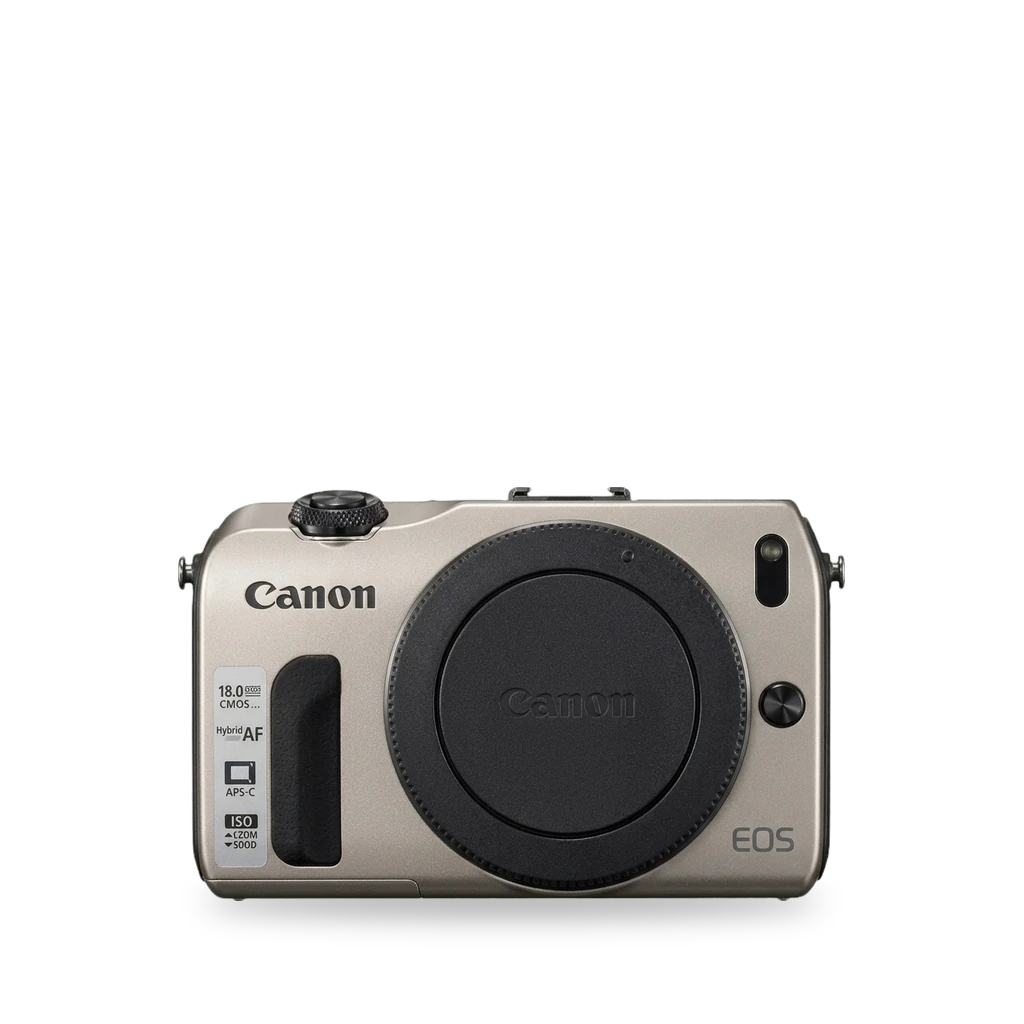
Photo: Katie Chan, CC BY-SA 4.0 · AI-edited (studio background)

CANON · CAMERA · 2012
Canon EOS M
Also called: EOS M · EOS-M
Canon's first mirrorless interchangeable-lens camera (EF-M, DIGIC 5). Magic Lantern is listed as compatible and brings focus peaking, zebras, and raw video. An sd_uhs overclock module enables higher raw modes but can kill cards. DIY infrared conversion is documented.[1][2][9][5]
Which one do I have?
Specs
Mods (5)
⚠ Mod at your own risk. We collect what others have published; we have not tested these mods. Read the safety notes
Magic LanternWorks
- ⚠ Can brick A mistake can leave the device unable to start.
- ⚠ Data loss Can erase what is on the device. Back up first.
Free GPL add-on from the SD card. Wikipedia lists the EOS M as compatible. Early builds add focus peaking, zebras, HDMI out, audio meters, and raw video.[2][12][14][15][13][9][8][11][7][16]
Parts
- SD or SDHC card, 32 GB or smaller Fits — Used for a first Magic Lantern install. Fast cards needed for raw.[14][9]
Good to know
- Magic Lantern runs from the card as an add-on over standard Canon firmware. It does not replace firmware in ROM.[15][13]
- Wikipedia lists the Canon EOS M as compatible with Magic Lantern.[2][12]
- A 2013 DVinfo thread: early ML adds focus peaking, zebras, live HDMI out, and audio meters, and records RAW video. Crop mode must be on for RAW.[9]
- On firmware 2, users reported needing to run the firmware update every boot; firmware 1 booted normally.[9]
- A 32 GB very high speed card was called essential for RAW.[9]
- Sans Mirror reported Magic Lantern reaching the EOS M in alpha form in 2013, described as mostly stable then.[8]
- Some users hit a shutter lock after install; temporary fixes include remounting the lens or power-cycling.[11]
- Hold SET at startup to bypass Magic Lantern for one session.[15]
⚠ Watch out
Guides:Magic Lantern INSTALL.txt
SD write-speed overclock (sd_uhs)Experimental
- ⚠ Data loss Can erase what is on the device. Back up first.
- ⚠ Can brick A mistake can leave the device unable to start.
Magic Lantern's sd_uhs module overclocks SD write speed for higher raw modes such as 2.5K. The project does not recommend it; cards have been reported destroyed.[10]
Good to know
- The sd_uhs module overclocks SD card write speed to allow 2.5K RAW, described as 12-bit lossless 2.35:1 in coverage.[10]
- Magic Lantern does not recommend the module; it is highly experimental.[10]
⚠ Watch out
- There have been reports of SD cards dying. Magic Lantern currently does not recommend using this module.[10]
Guides:No guide found yet.
Replace the LP-E12 batteryWorks
- ⚠ Lithium battery Uses or touches a lithium cell. A damaged cell can catch fire.
The camera takes a Canon LP-E12 pack (7.2 V, 875 mAh). LC-E12 / LC-E12E charge time is about 2 hours. CIPA life is about 230 shots at 23 C.[1]
Parts
- Canon LP-E12 Fits — Rechargeable lithium-ion pack for the EOS M.[1]
Good to know
- LP-E12: 7.2 V, 875 mAh. LC-E12 / LC-E12E about 2 hours at 23 C.[1]
- Rated battery life about 230 shots at 23 C (CIPA).[1]
Guides:No guide found yet.
Open the body / remove the screenWorks
- ⚠ Stored charge Capacitors keep a dangerous charge after the device is off.
Community iFixit guide: remove strap, screws, side panels, and back cover, then unclip the screen. About 20 minutes, moderate.[3]
Good to know
- Steps: remove strap and lens, outer screws, side panels, lift the back cover (brown clip above the battery), then detach the screen.[3]
- The screen is clipped into a base and may need to be moved back and forth to free it.[3]
Guides:Canon EOS M Disassembly
Infrared / full-spectrum conversionWorks
- ⚠ Stored charge Capacitors keep a dangerous charge after the device is off.
- ⚠ Permanent change Cuts, drills or glues the device. You cannot undo it.
Remove the IR-blocking filter for infrared work. Hackaday covers a DIY EOS-M conversion. Life Pixel offers a commercial conversion for EOS M bodies. The filter is delicate.[5][4][6]
Good to know
- Hackaday describes a DIY EOS-M teardown and IR-blocking filter removal as straightforward with a couple of hiccups.[5]
- A DIYPhotography teardown notes the IR-blocking filter is delicate and broke when removed, leaving the camera IR-sensitive. Reassembly is the harder part.[4]
- Life Pixel lists EOS M among Canon mirrorless bodies offered for infrared conversion.[6]
⚠ Watch out
- The IR-blocking filter can break during removal. Conversion is permanent.[4]
Buttons & modes
| What | How |
|---|---|
| Bypass Magic Lantern once | Hold SET at startup.[15] |
Sources (16)
- official EOS M Specifications · 2026-11-16
- wiki Canon EOS M - Wikipedia · 2026-11-16
- docs Canon EOS M Disassembly · 2026-11-16
- news How To Tear Down A Canon EOS-M · 2026-11-16
- news Building A Full-Spectrum Digital Camera On The Cheap · 2026-11-16
- shop Canon Mirrorless Infrared Conversion · 2026-11-16
- news Canon EOS M Firmware Version 2.0.2 · 2026-11-16
- news Magic Lantern for EOS M Goes Alpha · 2026-11-16
- forum Magic Lantern now works on the EOS-M with the new firmware · 2026-11-16
- news Magic Lantern lets the original Canon EOS M shoot 2.5K RAW video · 2026-11-16
- forum EOS M shutter lock issue when using Magic Lantern · 2026-11-16
- wiki Magic Lantern (firmware) - Wikipedia · 2026-11-15
- official magiclantern_simplified - reticulatedpines · 2026-11-15
- official Magic Lantern INSTALL.txt · 2026-11-15
- official Magic Lantern FAQ.txt · 2026-11-15
- blog Will Custom Firmware Void My Warranty? · 2026-11-15