Home › Devices › Canon › Canon PowerShot SX160 IS
 NEW!
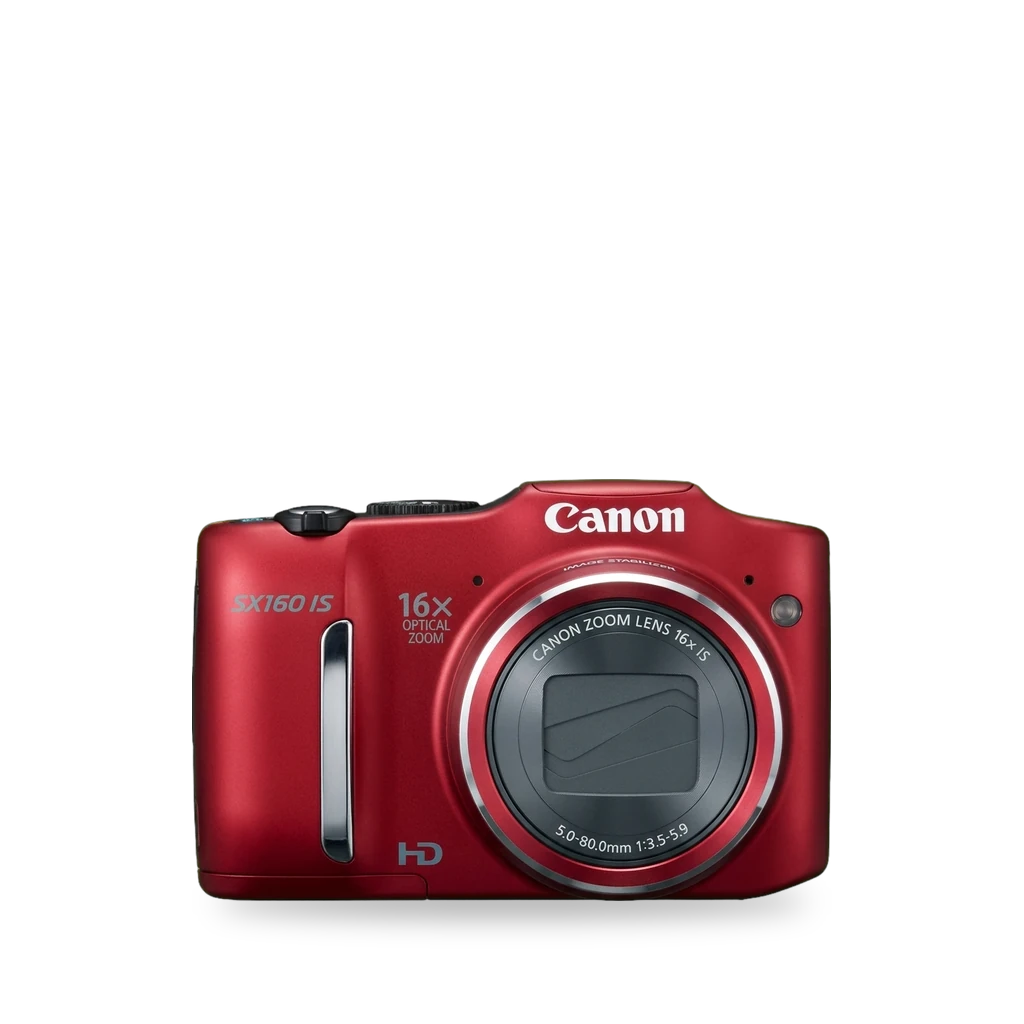
Photo: Elberth 00001939, CC BY-SA 3.0 · AI-edited (studio background)

CANON · CAMERA · 2012
Canon PowerShot SX160 IS
Also called: PowerShot SX160 IS · SX160 IS · SX160IS · Canon SX160
A 2012 AA-powered 16× zoom compact. CHDK has a wiki listing and a 2013 beta for firmware 1.00A, but the CHDK GitHub source mirror has no sx160 folder. iFixit covers case, LCD and button repairs.[6][7][8][14][1]
Which one do I have?
Specs
Mods (3)
⚠ Mod at your own risk. We collect what others have published; we have not tested these mods. Read the safety notes
CHDK custom firmware add-onExperimental
Loads from a prepared SD card into RAM. Adds RAW, scripts and exposure tools without rewriting flash. The wiki lists firmware 1.00A; a 2013 beta had crashes for some users, and the CHDK GitHub source mirror has no sx160 folder.[6][7][8][9][10][11]
Parts
- SD card prepared with CHDK Fits with conditions — Needs a build for this model and firmware (wiki: 1.00A). Autoboot uses the write-protect lock after the card is marked bootable.[10][6]
Good to know
- CHDK loads into RAM from the SD card and is not a permanent firmware upgrade. Remove the card or unlock the write-protect tab to boot Canon's firmware alone.[9][11]
- The CHDK wiki lists CHDK as available for the SX160 IS on firmware 1.00A.[6] unverified
- A 2013 porting-thread build log names Camera: sx160is with FW Vers: 100a. A beta was posted to unstable builds that June.[7]
- The platform folder list in the CHDK GitHub source mirror lists sx100is, sx110is and sx200is folders but no sx160 entry.[8] unverified
- Install: prepare the card, confirm firmware (ver.req/vers.req or ACID), then load via the Playback firmware-update menu or enable autoboot and lock the write-protect tab.[10][6]
⚠ Watch out
- The build must match the exact model and firmware. The wiki says ver.req may not work on this camera and recommends ACID instead.[6][10] unverified
- 2013 beta users reported a crash with manual focus, the camera switching off in the menu without retracting the lens, and a Hardware error on a 1-hour exposure.[7]
Guides:CHDK/doc/2_installation.txt at master · mattkime/CHDK · GitHubCHDK/doc/1_intro.txt at master · mattkime/CHDK · GitHub
LCD screen replacementWorks
- ⚠ Stored charge Capacitors keep a dangerous charge after the device is off.
Open the case, unlatch the LCD ribbon, and fit a replacement panel. iFixit rates it moderate, about 15–30 minutes.[14][12][15][13]
Special tools: #0 Phillips screwdriver
Good to know
- The back panel comes off first; the LCD ribbon is released by gently lifting the latch.[14]
- The same case path is used for the function-wheel and shutter-button guides.[14][15][13]
⚠ Watch out
- Be careful not to tear the LCD ribbon.[14]
Shutter button replacementWorks
- ⚠ Stored charge Capacitors keep a dangerous charge after the device is off.
Remove the outer case, then replace the shutter button on the front panel. Same screw path as the case guide.[13][12]
Special tools: #0 Phillips screwdriver
Good to know
- The shutter button sits on the front panel and is reached after the outer case is off.[13]
- Case disassembly starts with the black screws on the front, side and bottom; one guide comment reports twelve screws and a front-cover flex that must be disconnected.[12][13]
Guides:Canon PowerShot SX160 IS Shutter Button ReplacementCanon PowerShot SX160 IS Outer Case Replacement
Sources (15)
- official PowerShot SX160 IS - Canon Camera Museum · 2026-11-16
- official Opening and closing the memory card/battery cover (PowerShot SX160 IS) · 2026-11-16
- news Canon PowerShot SX160 IS · 2026-11-16
- news Canon PowerShot SX160 IS Review · 2026-11-16
- news Canon SX160 Review: Lab Tests & Sample Images · 2026-11-16
- wiki SX160IS | CHDK Wiki | Fandom (Wayback) · 2026-11-17
- forum SX160 IS porting thread - page 5 - DryOS Development - CHDK Forum (Wayback) · 2026-11-17
- official CHDK/platform at master · mattkime/CHDK · GitHub · 2026-11-17
- official CHDK/doc/1_intro.txt at master · mattkime/CHDK · GitHub · 2026-11-16
- official CHDK/doc/2_installation.txt at master · mattkime/CHDK · GitHub · 2026-11-16
- official CHDK/doc/3_faq.txt at master · mattkime/CHDK · GitHub · 2026-11-16
- docs Canon PowerShot SX160 IS Outer Case Replacement · 2026-11-16
- docs Canon PowerShot SX160 IS LCD Replacement · 2026-11-17
- docs Canon PowerShot SX160 IS Function Wheel Replacement · 2026-11-17