Home › Devices › Casio › Casio fx-CG50 (Prizm)
 NEW!
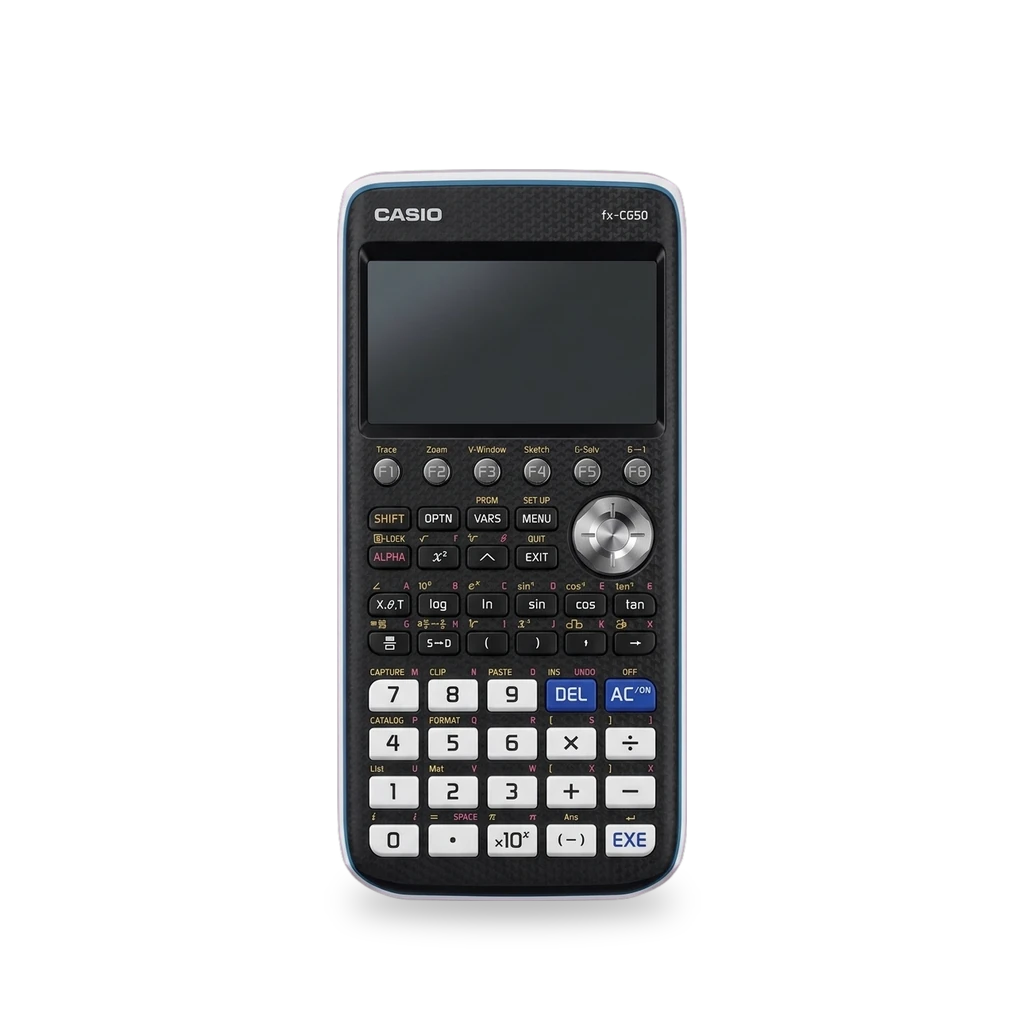
Photo: Quinticdot, CC BY 4.0 · AI-edited (studio background)

CASIO · CALCULATOR · 2017
Casio fx-CG50 (Prizm)
Also called: fx-CG50 · Casio Prizm · PriZM · CG50
Color graphing calculator with USB add-ins (.g3a). People load KhiCAS and other community programs, build with fxSDK / gint, and one builder has fitted a DIY LiPo pack in place of the four AAA cells.[1][13][7][8][14]
Which one do I have?
Specs
Mods (5)
⚠ Mod at your own risk. We collect what others have published; we have not tested these mods. Read the safety notes
Install .g3a add-insWorks
- ⚠ Data loss Can erase what is on the device. Back up first.
- ⚠ Check the law May break a law or rule where you live.
Copy community or self-built add-in files (.g3a) over USB. Official OS 3.xx supports them; wrong internal names or some OS builds can leave add-ins in the menu but unable to start.[9][10][1][4][5][6][3][13]
Good to know
- An fx-CG add-in is a native .g3a application that runs on fx-CG calculators and derivatives.[9][10]
- Casio Education lists a Windows OS update (3.80.XX1X) and USB data import for this model.[1]
- OS 3.80 initially broke third-party and even official add-ins (TLB / menu bug). Casio fixed it in 3.80.1 (April 2023).[4][5]
- Some fxSDK/gint add-ins appear in the menu but will not start if the internal name is wrong.[6]
- On the fx-CG50, power-off for 60 minutes cuts SDRAM power, so some volatile data is lost. Reset1 deletes most add-ins from storage.[3]
⚠ Watch out
Guides:No guide found yet.
KhiCAS computer algebraWorks
- ⚠ Check the law May break a law or rule where you live.
Adds a full symbolic CAS to the color Casio graphing line via USB mass storage. Ships as dual add-in binaries to stay under Casio's 2 MB single-file limit.[13][1]
Good to know
- KhiCAS brings symbolic math to Casio color graphing calculators including the fx-CG50.[13]
- Install is over USB mass storage as dual add-in binaries because of Casio's 2 MB single add-in size limit.[13]
⚠ Watch out
Guides:KhiCAS(io)
Develop add-ins (fxSDK / gint)Works
- ⚠ Data loss Can erase what is on the device. Back up first.
Cross-compile C/C++ .g3a add-ins with fxSDK, or run them under the gint unikernel for direct hardware control on the fx-CG50.[7][8][12][6]
Good to know
- fxSDK supports the fx-CG 10/20 and fx-CG 50. Build-cg produces a .g3a; fxsdk send-cg transfers it over USB via fxlink.[7]
- gint is an add-in unikernel for the fx-9860G II and fx-CG 50 families. Build with fxsdk build-cg.[8]
- Casio has no official SDK; PrizmSDK / libfxcg is the older community alternative documented on WikiPrizm.[12]
- gint add-ins are typically 50–100 kiB larger because the library is included.[6]
Guides:GitHub - lephe/Fx-SDKLephenixnoir/gintPrizmSDK_Setup_Guide | WikiPrizm
Rechargeable LiPo packExperimental
- ⚠ Lithium battery Uses or touches a lithium cell. A damaged cell can catch fire.
- ⚠ Soldering Needs a soldering iron. Heat can lift pads and burn skin.
A DIY pack replaces the four alkaline cells with a LiPo, charge control and a boost to about 5 V. Almost no case changes; a few wires tap the USB port. Battery status stops working when the pack cuts out.[14]
Good to know
- MagmaBow's pack uses a custom PCB for charging control and boosts the nominal 3.7 V LiPo to about 5 V.[14]
- Install needs almost no modifications to the calculator; a few bodge wires link the pack to the USB port.[14]
- The on-screen battery indicator stops working because the controller shuts the 5 V output off when the LiPo is flat.[14]
⚠ Watch out
- This is a lithium cell build, and no safety steps are published. Only an overview write-up exists, not a step-by-step guide.[14]
Guides:No guide found yet.
CPU overclockExperimental
- ⚠ Can brick A mistake can leave the device unable to start.
Community docs for the Prizm SH4-A describe raising the clock above the stock ~58 MHz. Near 470 MHz the hardware locks up; memory bus above 200 MHz can misbehave.[11][2]
Good to know
- The Prizm uses a custom SuperH SH4-A with no FPU. Stock clock is about 58 MHz from the crystal.[11][2]
- Going near or above about 470 MHz causes the hardware to lock up. Memory bus clock over 200 MHz can make memory operations misbehave.[11]
⚠ Watch out
- Near 470 MHz the hardware locks up, and a memory bus above 200 MHz can misbehave. The limits come from preliminary testing on the Prizm family.[11]
Guides:No guide found yet.
Sources (14)
- official fx-CG50 PRIZM color grapher | Casio Education · 2026-11-16
- news Hands-On with the New Casio Prizm fx-CG50 · 2026-11-16
- forum OS 3.10 announced for fx-CG10/20/50 · 2026-11-16
- forum OS Version 3.80 for fx-CG50... · 2026-11-16
- forum OS Version 3.80 for fx-CG50... (3.80.1 fix) · 2026-11-16
- forum gint/fxSDK: a performance-oriented kernel and add-in SDK · 2026-11-16
- official GitHub - lephe/Fx-SDK · 2026-11-16
- official Lephenixnoir/gint · 2026-11-16
- docs fx-CG add-ins - Cahute 0.6 · 2026-11-16
- wiki G3A_File_Format | WikiPrizm · 2026-11-16
- wiki CPU Clocks | WikiPrizm · 2026-11-16
- wiki PrizmSDK_Setup_Guide | WikiPrizm · 2026-11-16
- official KhiCAS(io) · 2026-11-15
- news Calculator Battery Mod Lets You Go The Distance · 2026-11-16