Home › Devices › GPD › GPD Pocket
 NEW!
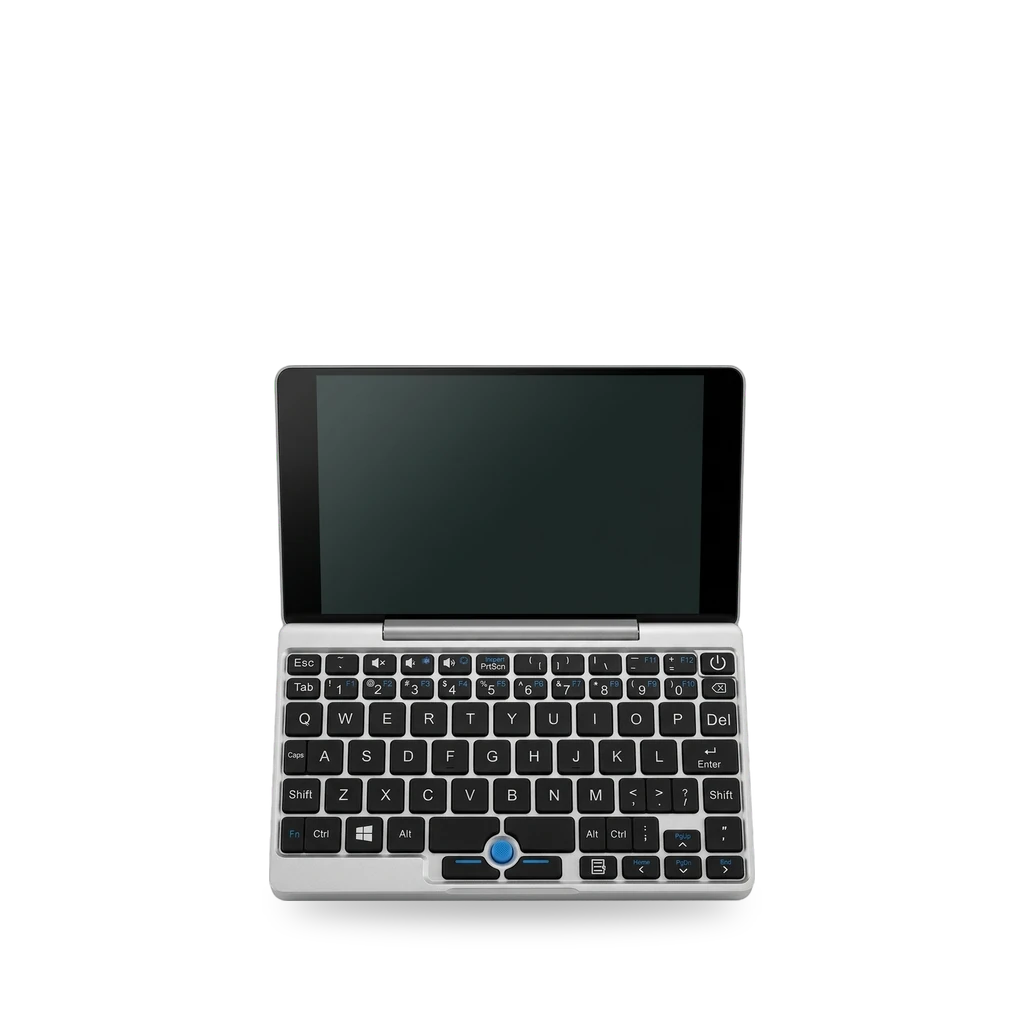
Photo: Dienthoaiquangcao60, CC BY 4.0 · AI-edited (studio background)

GPD · LAPTOP · 2017
GPD Pocket
Also called: GPD Pocket 1 · GPD Pocket Mini Laptop (1st Generation) · GPD Pocket MicroPC
7-inch UMPC with Atom x7-Z8750, 8 GB RAM and a 7000 mAh pack. Common work is Linux fan/Wi-Fi tuning and an M.2 SSD swap on units that shipped with a removable drive.[5][2][1][8]
Which one do I have?
Specs
| Screen | 7-inch IPS touchscreen, 1920×1200[2][5][7] |
| CPU / RAM | Intel Atom x7-Z8750, 8 GB RAM[3][5][2] |
| Storage | Sources disagree: 128 GB eMMC (non-replaceable) vs removable factory M.2 SSD[2][7][1] |
| Battery | 7000 mAh Li-Po; reviewers saw about 6–9 hours in real use[5][6][7] |
| Ports / radio | USB-C, USB-A, micro HDMI, 3.5 mm; 802.11ac Wi-Fi (Broadcom 4356), Bluetooth 4.1[5][2] |
| Input | Keyboard with pointing stick (blue nub) and two buttons; no trackpad[5][6] |
Mods (6)
⚠ Mod at your own risk. We collect what others have published; we have not tested these mods. Read the safety notes
M.2 SSD upgradeWorks
- ⚠ Data loss Can erase what is on the device. Back up first.
Open the base, remove the factory M.2 SSD screw, and fit a 2242 NGFF SATA III drive. Some reviews say storage is fixed eMMC — confirm you have a screw-down M.2 module before buying.[1][2][7]
Special tools: small screwdriver, pry tool
Parts
- 2242 NGFF SATA III M.2 SSD Fits with conditions — Author recommended a 512 GB 2242 Kingston in 2019; that size was the practical max then.[1]
Good to know
- Factory M.2 SSD is held by one screw and can be replaced with a 2242 NGFF SATA III drive.[1]
- Case opening: remove five screws on the base, then pry the bottom panel from a front corner.[1]
- ArchWiki and a 2017 review list 128 GB eMMC as non-replaceable, which conflicts with the removable M.2 guide.[2][7][1]
⚠ Watch out
- Back up first. The guide says modifications may void warranty and can lose data.[1]
Guides:Upgrading the M.2 Solid State Drive on the GPD Pocket MicroPC
Linux fan tuningWorks
Use the gpd-pocket-fan kernel module so the fan is not always on under AC, and set temperature limits. Newer gpd-fan kernel docs cover Pocket 4, not this unit.[2][3][4]
Good to know
- With a recent kernel the fan should work out of the box; by default it spins whenever on AC.[2]
- Kernel parameter or module option gpd-pocket-fan.speed_on_ac=0 stops the always-on-AC behaviour.[2][3][4]
- temp_limits on the module sets the fan on/off temperature levels.[3]
- If the fan clicks, power off, open the back panel, gently free the fan, then retry.[2]
Wi-Fi country code (brcmfmac)Works
- ⚠ Check the law May break a law or rule where you live.
Edit the Broadcom 4356 firmware text so the adapter can use channels beyond the global 1–11 set after newer kernels tightened the default.[2][4]
Good to know
- With a 2021-era kernel and firmware, the Broadcom 4356 stopped seeing networks on channels beyond 1–11.[2]
- Fix: edit /usr/lib/firmware/brcm/brcmfmac4356-pcie.gpd-win-pocket.txt and change ccode=X2 to your country, then reboot.[2]
- NixOS sample firmware uses a region ccode value in the same file family.[4]
⚠ Watch out
Guides:GPD Pocket - ArchWiki
TLP power savingWorks
Install TLP for Linux power tuning. Turn Wi-Fi power saving off — speed drops a lot when it is left on.[2][4]
Good to know
- ArchWiki recommends TLP and disabling Wi-Fi power saving because speed drops massively otherwise.[2]
- NixOS configs set WIFI_PWR_ON_AC and WIFI_PWR_ON_BAT off, and tune the mmcblk0 I/O scheduler.[4]
Guides:GPD Pocket - ArchWikiGPD Pocket - Official NixOS Wiki
Screen rotationWorks
A kernel patch should hint landscape rotation automatically; otherwise set rotation by hand (fbcon=rotate:1 on NixOS samples).[2][4]
Good to know
- With a kernel patch, Linux should automatically hint screen rotation for the GPD Pocket; otherwise set it manually.[2]
- NixOS sample kernel params include fbcon=rotate:1.[4]
Guides:GPD Pocket - ArchWiki
Ubuntu BIOS variantExperimental
- ⚠ Can brick A mistake can leave the device unable to start.
- ⚠ Data loss Can erase what is on the device. Back up first.
- ⚠ Permanent change Cuts, drills or glues the device. You cannot undo it.
Ubuntu needs a special BIOS flashed under Windows first. Flashing can cause malfunction or permanent damage.[8]
Good to know
- Ubuntu needs a special BIOS variant, which must be installed under Windows first, then the Ubuntu firmware flashed.[8]
- BIOS 0807 changed boot logic so the device can boot below 10% battery.[8]
⚠ Watch out
- Flashing firmware or BIOS can cause malfunction, data loss or permanent damage.[8]
Guides:No guide found yet.
Sources (8)
- blog Upgrading the M.2 Solid State Drive on the GPD Pocket MicroPC · 2026-11-17
- wiki GPD Pocket - ArchWiki · 2026-11-17
- wiki GPD Pocket - Gentoo wiki · 2026-11-17
- wiki GPD Pocket - Official NixOS Wiki · 2026-11-17
- news GPD Pocket (7 inch Windows laptop) is now available for $500 · 2026-11-17
- news GPD Pocket review: An outstanding, but niche, PC for your pocket | Windows Central · 2026-11-17
- blog The GPD Pocket (Medium review) · 2026-11-17
- shop GPD Pocket Mini Laptop(1st Generation) – DROIX Knowledge Base · 2026-11-17