Home › Devices › OLPC › OLPC XO-1
 NEW!
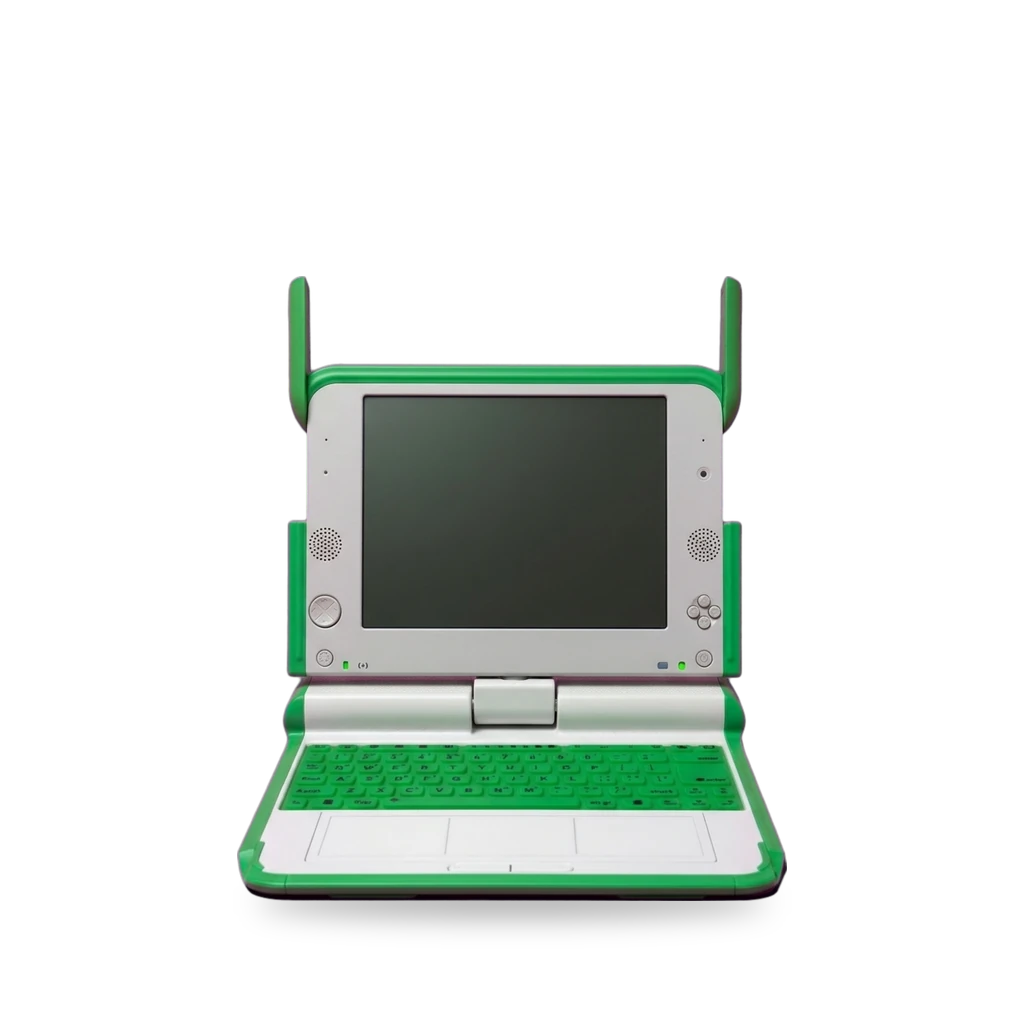
Photo: Felix Winkelnkemper, CC BY-SA 4.0 · AI-edited (studio background)

OLPC · LAPTOP · 2007
OLPC XO-1
Also called: XO-1 · OLPC XO · One Laptop Per Child XO-1
2007 OLPC XO-1 (Quanta, Geode LX 700). Developer mode unlocks USB/SD boot and alternative OS images; Open Firmware overclock and field triage tips are documented. Motherboard upgrade kits to XO-1.75 existed for deployments.[14][3][2][1][10]
Which one do I have?
Specs
Mods (8)
⚠ Mod at your own risk. We collect what others have published; we have not tested these mods. Read the safety notes
Usable OLPC OS build 883 (2024 guide)Works
- ⚠ Can brick A mistake can leave the device unable to start.
- ⚠ Data loss Can erase what is on the device. Back up first.
Install OLPC OS 11.3.0 build 883 with a Gnome desktop, then fix Fedora repos and add RPM Fusion. Softest path to a usable XO-1 today.[2]
Good to know
Boot alternative OS from USB or SDWorks
- ⚠ Can brick A mistake can leave the device unable to start.
- ⚠ Data loss Can erase what is on the device. Back up first.
In developer mode the firmware looks for /boot/olpc.fth on USB, then SD, then internal storage. Keep root and swap on removable media when possible.[3][7][6]
Good to know
- In developer mode the XO searches USB, then SD, then internal storage for /boot/olpc.fth.[3]
- The XO-1 can be booted from an external USB or SD card; a developer key is required for those options.[7][3]
- Place root and swap on removable media; do not create a swap partition larger than 4 GB.[3]
- Most machines ship with security that refuses unsigned software until a developer key / security change is applied.[6]
⚠ Watch out
- Some Sugar-on-a-Stick install options wipe the /security directory and can remove developer leases or keys.[7]
Guides:Sugar on a Stick/Installation/OLPCOLPC XO-1 laptop - Gentoo wiki
Write an OS image to internal NANDExperimental
- ⚠ Can brick A mistake can leave the device unable to start.
- ⚠ Data loss Can erase what is on the device. Back up first.
- ⚠ Permanent change Cuts, drills or glues the device. You cannot undo it.
Flash a JFFS2 or OS image onto the 1 GB NAND, replacing what is there. Needs a developer key. Buildroot and older Dextrose/copy-nand paths document the idea.[6][8][13]
Good to know
- XO-1 internal NAND has no FTL and needs a flash-friendly filesystem; Buildroot makes a JFFS2 root image.[6]
- A machine set up to reflash NAND from USB must have a developer key (be unlocked).[13]
- Deprecated Dextrose docs used copy-nand from an SD image at the ok prompt.[8]
⚠ Watch out
- The Dextrose documentation for copying an image to NAND is marked deprecated and obsolete.[8]
Puppy Linux (XOpup) buildsExperimental
- ⚠ Can brick A mistake can leave the device unable to start.
- ⚠ Data loss Can erase what is on the device. Back up first.
Community scripts build Puppy Linux kernels for XO-1 and XO-1.5. Old field notes warn against casually mounting the internal NAND.[5][4]
Good to know
- Pox_git holds scripts to build Puppy Linux for OLPC XO laptops, including XO-1 kernels.[5]
- Building everything needs at least 3 GB free disk space.[5]
- Mounting internal NAND from Puppy needed MTD device nodes copied from OLPC OS; automounting NAND was not recommended.[4]
Guides:No guide found yet.
Overclock Geode LX via Open FirmwareExperimental
- ⚠ Can brick A mistake can leave the device unable to start.
- ⚠ Data loss Can erase what is on the device. Back up first.
Write an MSR at the Open Firmware prompt to raise CPU/memory clocks. Needs a developer key. 2008 method; not confirmed on current firmware.[1]
Good to know
- Overclocking the Geode LX is done by writing a model-specific register at the Open Firmware prompt.[1]
- You must have a developer key or have previously disabled security.[1]
- One report ran reliably at 566 MHz CPU / 233 MHz memory from an SD card under Ubuntu.[1]
⚠ Watch out
- Overclocking may cause stability problems, data errors, hardware damage, and extra heat in a passively cooled machine.[1]
Guides:OLPC XO Hacks: Overclocking an XO Laptop Geode LX 700 CPU
Motherboard upgrade to XO-1.75Discontinued
- ⚠ Permanent change Cuts, drills or glues the device. You cannot undo it.
- ⚠ Data loss Can erase what is on the device. Back up first.
Deployment upgrade kits swapped the Geode board for an ARM XO-1.75 motherboard (minimum order historically 100). Needs a WLAN bracket on XO-1 shells.[10][11]
Good to know
- The kit swaps the motherboard, replacing the x86 chip with an ARM-based processor.[10]
- Kits were sold with a minimum order of 100 and aimed at large deployments, not hobbyists.[10]
- Upgrading an XO-1 to a higher motherboard needs a small metal bracket to hold the WLAN card.[11]
Guides:No guide found yet.
USB keyboard in the XO shellExperimental
Battery pull to clear freezesWorks
- ⚠ Lithium battery Uses or touches a lithium cell. A damaged cell can catch fire.
Field triage: power down and remove the battery for about a minute to clear a frozen keyboard after boot. Clock and NAND issues need a developer key.[13][9]
Good to know
Sources (14)
- news OLPC XO Hacks: Overclocking an XO Laptop Geode LX 700 CPU · 2026-11-16
- blog How to get a usable OLPC XO-1 system in 2024 · 2026-11-16
- wiki OLPC XO-1 laptop - Gentoo wiki · 2026-11-16
- forum XOpup Interest Group. Puppy Linux for the OLPC XO-1 · 2026-11-16
- official Pox_git: Puppy linux building for the OLPC XO laptops · 2026-11-16
- official board/olpc/readme.txt - Buildroot · 2026-11-16
- wiki Sugar on a Stick/Installation/OLPC · 2026-11-16
- wiki Dextrose - Sugar Labs · 2026-11-16
- news XO LiFePO4 Laptop Battery Life One Year Later · 2026-11-16
- news XO upgrade kit turns an XO-1 Laptop into an XO-1.75 · 2026-11-16
- news Rejuvenate Your Old XOs with OLPC's Upgrade Kits · 2026-11-16
- news OLPC Help: Replacing the XO Laptop Keyboard · 2026-11-16
- news XO-1 Laptop Triage: 5 Quick OLPC Repair Tips · 2026-11-16
- wiki OLPC XO - Wikipedia · 2026-11-16