Home › Devices › Sony › PlayStation Vita (PCH-1000)
 NEW!
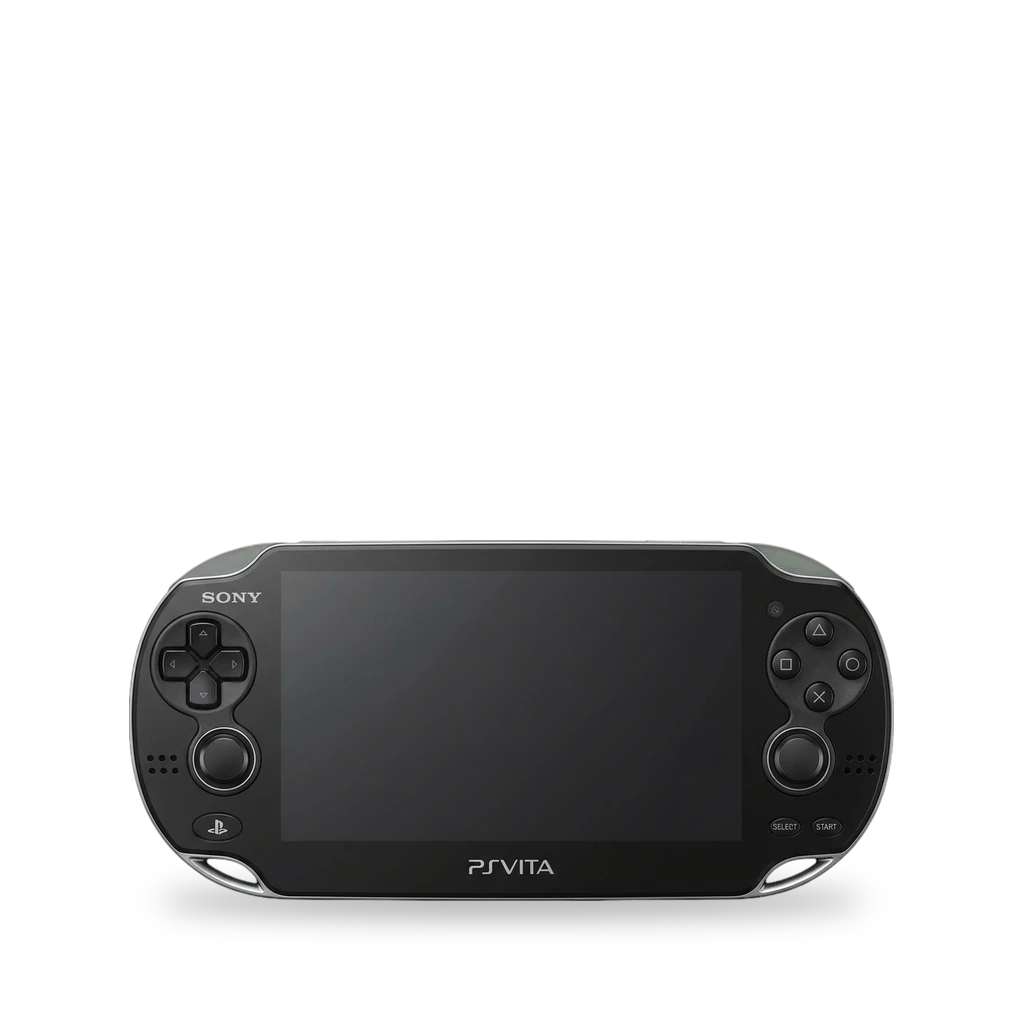
Photo: Evan-Amos, Public domain · AI-edited (studio background)

SONY · HANDHELD CONSOLE
PlayStation Vita (PCH-1000)
Also called: PS Vita 1000 · PCH-1000 · PCH-1100 · OLED Vita · PS Vita
Sony's original PlayStation Vita, the PCH-1000 series, with a 5-inch OLED screen. The Vita Hacks Guide starts a jailbreak in the browser on firmware 3.74, then can install permanent custom firmware on 3.65. An SD2Vita adapter adds microSD storage. A separate board can replace the charge connector with USB-C.[1][5][2][4][8]
Which one do I have?
| Model | Variant | Year | How to tell |
|---|---|---|---|
| PCH-1000 | PCH-1000 series, OLED | — | PCH-1000 series. 5-inch OLED touchscreen at 960 by 544, plus a rear touchpad, two analog sticks, a D-pad, and action buttons. Proprietary charge port, accessory port, stereo speakers, and a PS Vita card slot. The game-card slot is the one SD2Vita adapters use.[1][5][6][4] |
| PCH-1100 | 3G | — | The 3G version of the Vita, with a SIM card slot.[6] |
Mods (6)
⚠ Mod at your own risk. We collect what others have published; we have not tested these mods. Read the safety notes
HENlo and HENkaku EnsōWorks
- ⚠ Can brick A mistake can leave the device unable to start.
Browser jailbreak for a retail Vita on firmware 3.74, needing only an internet connection on the Vita. VitaDeploy can downgrade to 3.65 and install HENkaku Ensō so the custom firmware stays.[2][3][5]
Good to know
- The getting-started guide covers firmware 1.03 through 3.74. A retail unit on 3.74 starts with the HENlo browser exploit.[2]
- HENlo is documented for firmware 3.65, 3.68, and 3.74. In the built-in browser, open http://jailbreak.psp2.dev. The only requirement listed is an internet connection on the Vita.[3]
- HENlo enables unsafe homebrew permissions and installs VitaDeploy on the LiveArea home screen. VitaDeploy is the path to a downgrade to 3.65 and a permanent HENkaku Ensō install.[3][5]
- VitaDeploy is also described as a suite for formatting storage, setting up plugins, and installing homebrew apps.[5]
⚠ Watch out
- A used Vita, or one that was modded before, should be fully restored before this setup.[2]
Guides:Get Started - Vita Hacks GuideUsing HENlo - Vita Hacks Guide
SD2Vita microSD storage (YAMT)Works
YAMT mounts a microSD adapter in the game-card slot as the main storage. It needs HENkaku Ensō on firmware 3.60 or 3.65. One setup guide names a Funturbo adapter.[4][5]
Parts
- SD2Vita microSD adapter Fits — Sits in the game-card slot. Retro Game Corps names a Funturbo adapter for this slot.[4][5]
Good to know
psvsd microSD adapterExperimental
A psvsd adapter is listed next to the SD2Vita as a microSD adapter that YAMT can use. If YAMT does not work, the guide points to the StorageMgr guide.[4]
Parts
- psvsd adapter Fits with conditions — Listed in the YAMT guide as a compatible microSD adapter. The guide sends psvsd users to the StorageMgr guide if YAMT does not work.[4]
Good to know
- The YAMT guide lists a microSD card in a psvsd adapter as a compatible storage device, and sends psvsd users to the StorageMgr guide if YAMT does not work.[4]
Guides:No guide found yet.
Adrenaline (PSP software)Works
Replace the batteryWorks
- ⚠ Lithium battery Uses or touches a lithium cell. A damaged cell can catch fire.
iFixit rates the battery swap Easy: about 20 to 30 minutes. The pack is held by a plastic bar. Free the battery and touch screen controller cables carefully when you split the case.[7]
Good to know
- The guide is rated Easy and takes about 20 to 30 minutes.[7]
- The case opens with four 6.4 mm screws on the back, two 5.4 mm screws under the accessory-port cover, and two 5.4 mm screws on the bottom, all Phillips #00.[7]
- A plastic bar held by two 5.0 mm screws keeps the battery in the rear shell.[7]
⚠ Watch out
- Wires still join the two case halves, so do not yank them apart. Free the battery cable and the touch screen controller cable with a spudger.[7]
USB-C charge portExperimental
- ⚠ Soldering Needs a soldering iron. Heat can lift pads and burn skin.
An open-source board replaces the original charge connector with a standard USB-C port, so the Vita can charge from a phone or laptop charger.[8]
Parts
- giltesa PS Vita 1000 USB-C kit Fits — Replaces the original charge connector. The project lists the board as compatible with the "Sony PS Vita".[8]
Good to know
- The kit replaces the original charge connector with USB-C, so the Vita can charge from a phone or laptop USB-C charger.[8]
- The project is open source under a CC BY-NC-SA 4.0 license.[8]
Guides:No guide found yet.
Sources (8)
- official Hardware part names (PCH-1000 series) - PlayStation Vita User's Guide · 2026-11-14
- docs Get Started - Vita Hacks Guide · 2026-11-14
- docs Using HENlo - Vita Hacks Guide · 2026-11-14
- docs YAMT (SD2Vita) - Vita Hacks Guide · 2026-11-14
- blog Guide: PlayStation Vita - Retro Game Corps · 2026-11-14
- wiki PlayStation Vita Repair - iFixit · 2026-11-14
- wiki PlayStation Vita Battery Replacement - iFixit · 2026-11-14
- docs Sony PS Vita USB-C Kit - giltesa · 2026-11-14