Home › Devices › Texas Instruments › TI-84 Plus CE
 NEW!
Photo: KAP03, CC BY-SA 4.0 · AI-edited (studio background)

TEXAS INSTRUMENTS · CALCULATOR · 2015
TI-84 Plus CE
Also called: TI-84+CE · 84 Plus CE · TI-84 Plus CE Python · TI-84 Plus CE-T · TI-83 Premium CE
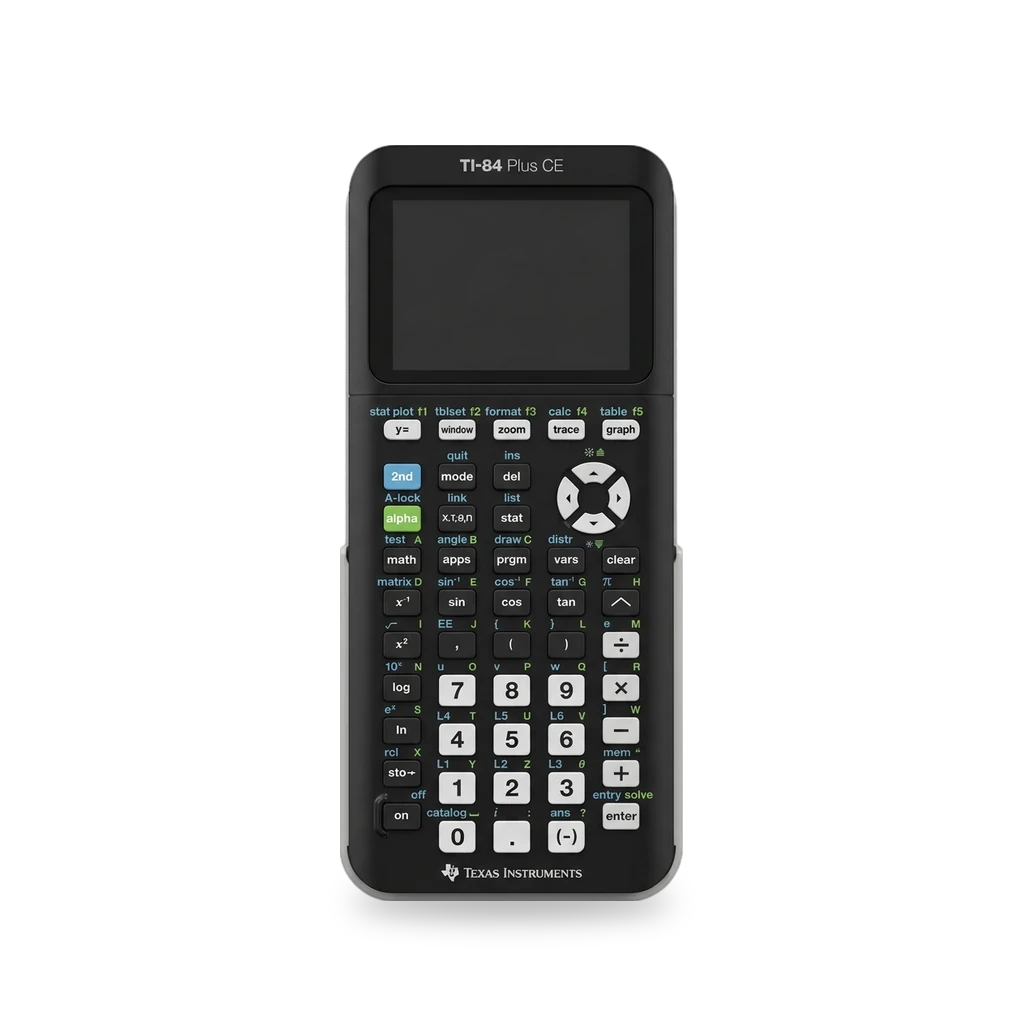
Color graphing calculator from spring 2015. The TI-84 Plus CE uses an ez80 at 48 MHz and a 2.8-inch 320×240 screen. OS 5.5.1 and later restricts assembly programs. arTIfiCE turns them back on: v2 through OS 5.8.4, and v3 on OS 5.8.5 only.[1][3]
Which one do I have?
| Model | Variant | Year | How to tell |
|---|---|---|---|
| TI-84 Plus CE | Color edition | 2015 | Color graphing calculator with mini-USB and no 2.5 mm I/O port. Python is only on the Python edition, which arTIfiCE lists as TI-84 Plus CE (Python).[1][3] |
| TI-84 Plus CE-T | Python Edition | — | arTIfiCE lists the TI-84 Plus CE-T (Python Edition) in the same install family as the TI-84 Plus CE.[3] |
| TI-83 Premium CE | Edition Python | — | Same arTIfiCE family as the TI-84 Plus CE. On this model, Inequalz is under 2nde, then résol. On the TI-84 Plus CE it is under apps.[3] |
Specs
| CPU | ez80 at 48 MHz (TI-84 Plus CE)[1] |
| RAM | 256 KB total, 154 KB user-accessible (TI-84 Plus CE)[1] |
| Storage | 4.0 MB flash, 3.0 MB user-accessible (TI-84 Plus CE)[1] |
| Screen | 2.8-inch 320×240, 16-bit color, not a touchscreen (TI-84 Plus CE)[1] |
| Battery | Rechargeable 1200 mAh lithium-polymer; about 30 hours at maximum brightness (TI-84 Plus CE)[1] |
| Ports | Mini-USB. No 2.5 mm I/O port (TI-84 Plus CE)[1] |
Mods (6)
⚠ Mod at your own risk. We collect what others have published; we have not tested these mods. Read the safety notes
arTIfiCE jailbreakWorks
- ⚠ Check the law May break a law or rule where you live.
- ⚠ Data loss Can erase what is on the device. Back up first.
A file you send from a computer. It brings back assembly programs that OS 5.5.1 and later block. v2 covers OS 5.8.4 and earlier. v3 is for OS 5.8.5 only. You do not need it on OS 5.4 or earlier.[3][1][2]
Parts
- arTIfiCE program file Fits with conditions — OS 5.8.4 and earlier uses arTIfiCE_v2.1.8xp. OS 5.8.5 uses arTIfiCE.8xp plus INEQUVAR.8xv, and Inequalz must already be on the calculator.[3]
Good to know
- OS 5.5.1 and higher restricts programs written in assembly.[1]
- The docs list the TI-84 Plus CE (Python), the TI-84 Plus CE-T (Python Edition), and the TI-83 Premium CE (Edition Python). v3 supports CE OS 5.8.5 only. v2 supports CE OS through 5.8.4. It is not needed on OS 5.4 or earlier.[3]
- On OS 5.8.4 and earlier, transfer arTIfiCE_v2.1.8xp. Open the prgm menu, choose TI-BASIC if asked, run the first program (A), and press enter. Press mode to leave the shell.[3]
- On OS 5.8.5, back up first and reset RAM. Send arTIfiCE.8xp to RAM, open Inequalz, then send INEQUVAR.8xv. The calculator installs AsmHook2 and reboots. Launch AsmHook2 once from the apps menu. It stays through reboots and RAM resets. After a later RAM reset, launch it once more. The v3 app is removable.[3]
- On the TI-84 Plus CE, open Inequalz from apps. On the TI-83 Premium CE, press 2nde, then résol, then Inequalz. You can send the files with TI Connect CE or with WebTILP / TILP.[3]
- arTIfiCE does not downgrade the OS. It only makes assembly programs launchable again.[3]
⚠ Watch out
- The v3 steps start with a RAM reset. Archive or back up anything you need first.[3]
- It does not bypass Press-to-Test. For v1 and v2, the OS deletes or disables those files in exam mode, and you transfer them again afterward. Sending a file to the calculator leaves exam mode.[3]
- If Inequalz later says CONFLICTING APPS, choose option 2, then launch AsmHook2 again after you leave Inequalz.[3]
- The latest official OS disables most games and some programs. Once you update, you cannot downgrade. OS 5.4.0 is the last OS the recovery guide calls safe. Higher versions need arTIfiCE for many programs.[2]
Cesium shellWorks
- ⚠ Data loss Can erase what is on the device. Back up first.
A shell for the TI-84 Plus CE and the TI-83 Premium CE. Run the CESIUM program once. It adds an app under apps. You transfer the installer, not the finished app.[4][1][3]
Good to know
- Cesium is installed by running the CESIUM program. The new app opens from the apps button. The app itself cannot be sent to another calculator. Send the installer instead.[4]
- Green letter keys jump to programs that start with that letter. From outside the app, on and prgm launches Cesium.[4]
- It can launch and transfer files on a FAT32 USB drive. Use prgm to copy a file from the drive onto the calculator. Running a program straight from the drive can crash if it needs subprograms or AppVars, uses an old compression mode, or changes itself while running.[4]
- To uninstall, press 2nd, then plus, plus, 2, and 1, and delete the Cesium application and AppVar. You can also delete the app from inside Cesium.[4]
⚠ Watch out
Guides:GitHub - mateoconlechuga/cesium: A GUI shell for the TI-84+CE
C and C++ programsWorks
The CE Toolchain builds C and C++ programs for the TI-84 Plus CE series on a computer. The repository README points to the project's documentation for the rest of the setup.[7][1]
Good to know
- The toolchain builds programs in C and C++ natively for the TI-84 Plus CE calculator series.[7]
- iFixit lists C as an unofficial language on this calculator, next to ICE. Official languages are assembly, TI-BASIC, and Python on the Python edition.[1]
⚠ Watch out
- OS 5.5.1 and higher restricts assembly programs.[1]
Guides:No guide found yet.
Doors CE shellNot possible
Doors CE 9 was announced for the CE calculators and then left unreleased. The project says it will probably never ship, after TI removed official assembly support on the CE.[5]
Good to know
- Doors CE 9 was announced on December 10, 2015. On May 22, 2020 the project said it will probably never be released, especially after official assembly support was removed on CE calculators.[5]
Reinstall the OSWorks
- ⚠ Can brick A mistake can leave the device unable to start.
- ⚠ Data loss Can erase what is on the device. Back up first.
- ⚠ Permanent change Cuts, drills or glues the device. You cannot undo it.
TI Connect CE on Windows or macOS, or TiLP on Linux, can send an OS over mini-USB. Hold 2nd and del, then tap the reset button, to open Install OS mode. Do not unplug the cable while it sends.[2]
Special tools: mini-USB cable
Good to know
- Hold 2nd and del, press and release the reset button on the back, and keep holding until the screen says Install OS now. Then you can let go.[2]
- Try OS 5.4.0 first. If that will not install, use the latest OS from Texas Instruments. In TI Connect CE, use Actions, then send OS/Bundle to calculators. The send takes a few minutes.[2]
- OS 5.4.0 is the last OS the guide calls safe. Anything newer needs arTIfiCE to run many programs. After you install the latest OS, you cannot downgrade.[2]
⚠ Watch out
Guides:TI-84 Plus CE Recovery Techniques. - iFixit Repair Guide
New batteryWorks
- ⚠ Lithium battery Uses or touches a lithium cell. A damaged cell can catch fire.
- ⚠ Data loss Can erase what is on the device. Back up first.
The TI-84 Plus CE has a replaceable 1200 mAh pack behind a small door. Two captive Phillips screws hold the door. The six Torx screws around the case are not part of this job.[6][1]
Special tools: Phillips #0 screwdriver
Parts
- TI-84 Plus CE battery Fits — 1200 mAh pack in the battery door. The guide lists a Texas Instruments part and an Amazon one.[6][1]
Good to know
- Turn the calculator off first. Two Phillips #0 or #00 screws hold the battery door. They stay in the door. Six Torx T6 screws around the case are a different set. Leave them in.[6]
- The pack is a rechargeable 1200 mAh lithium-polymer cell. At maximum brightness it is about 30 hours of continuous use, or up to one month with standard use.[1]
⚠ Watch out
- Taking the battery out clears RAM. Archive what you need, or back it up to a computer, before you open the door.[6]
Guides:Texas Instruments TI-84 Plus CE Battery Replacement - iFixit Repair Guide
Buttons & modes
| What | How |
|---|---|
| Clear RAM | Take off the slide case. Hold the reset button on the back for at least 2 seconds, then release. The screen should say RAM Cleared. The archive is left in place.[2] |
| Install OS mode | Hold 2nd and del. Press and release the reset button on the back, and keep holding 2nd and del until the screen says Install OS now.[2] |
| Launch Cesium | From outside Cesium, press on and prgm together.[4] |
| Leave the arTIfiCE shell | On OS 5.8.4 and earlier, after program A opens the shell, press mode to leave it.[3] |
Sources (7)
- wiki Texas Instruments TI-84 Plus CE Repair Help: Learn How to Fix It Yourself - iFixit · 2026-11-14
- wiki TI-84 Plus CE Recovery Techniques. - iFixit Repair Guide · 2026-11-14
- docs arTIfiCE | Jailbreak for TI CE calculators · 2026-11-14
- docs GitHub - mateoconlechuga/cesium: A GUI shell for the TI-84+CE · 2026-11-14
- wiki Main Page | Doors CS - Cemetech · 2026-11-14
- docs Texas Instruments TI-84 Plus CE Battery Replacement - iFixit Repair Guide · 2026-11-15
- official GitHub - CE-Programming/toolchain: Toolchain and libraries for C/C++ programming on the TI-84+ CE calculator series · 2026-11-15