Home › Devices › Microsoft › Microsoft Zune 30
 NEW!
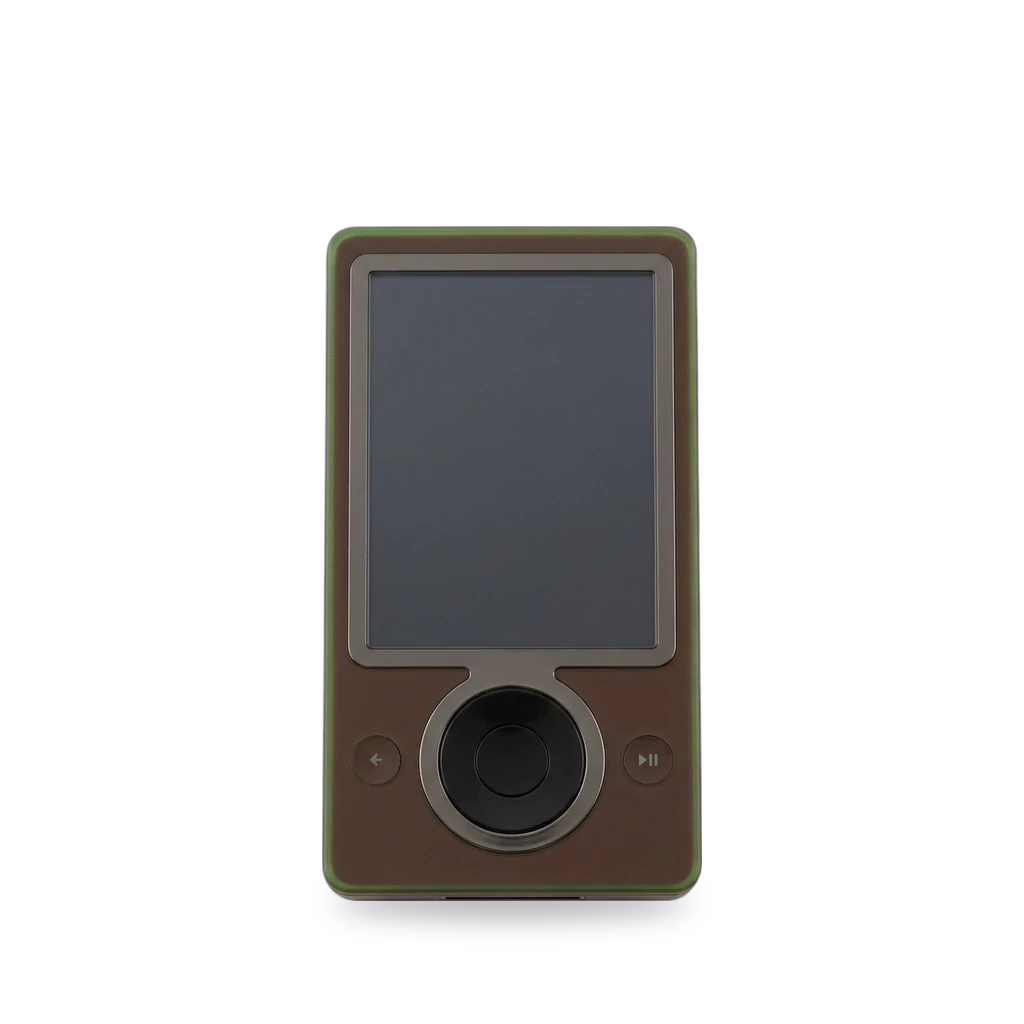
Photo: Travis Hornung, CC BY 2.0 · AI-edited (studio background)

MICROSOFT · MUSIC PLAYER
Microsoft Zune 30
Also called: Zune 30GB · Zune 30 GB · Zune first generation
A 30 GB hard-drive music player. The sources describe moderate repairs (battery and hard drive swaps; iFixit's guides disagree between Easy and Moderate) and a community way to install the last official firmware. No public custom firmware was found.[1][4][3][14]
Which one do I have?
| Model | Variant | Year | Firmware | How to tell |
|---|---|---|---|---|
| 1089 | Zune 30 (30 GB hard disk) | — | 3.30 | Model number from 2006 press reports (FCC name "Toshiba 1089"); not yet confirmed on a device back label. An FCC record for a similar HDD player (UMEK30AWL, Dynabook) does not list 1089, so the records conflict.[1][2][3][8][9][10] unverified |
Mods (6)
⚠ Mod at your own risk. We collect what others have published; we have not tested these mods. Read the safety notes
Install the last official firmware (3.30) without Microsoft serversExperimental
- ⚠ Can brick A mistake can leave the device unable to start.
- ⚠ Data loss Can erase what is on the device. Back up first.
A community method gets firmware 3.30 onto a Zune 30. A 2019 post says Microsoft's update servers are gone. The method is not official.[3][2][6][11]
Good to know
- The latest firmware listed for the Zune 30 is 3.30, released 2010-01-26 with Zune software 4.2.202.0. The list note says it is the latest for all models except the Zune HD, so it applies to the Zune 30 by inference.[2] unverified
- The Zune 30 shipped with firmware 1.0.[2]
- Firmware 2.3 (2007-12-18) fixed batteries discharging too early on the Zune 80 and upgraded Zune 30.[2]
- A January 2019 post says you need to get on the latest firmware, 3.30 for the author's Zune 30, and that Zune Software 4.8 was then on the Microsoft Download Center. That is a 2019 statement.[3]
- When checked on 2026-11-13, Microsoft's Zune Software 4.8 download page (id 27163) returned a 404 (not found). This does not show why. Microsoft may have moved it, and no replacement official page was found.[11]
- The author's method: the firmware comes as an MSI file that you extract (for example with lessmsi) instead of installing. A simpler route points resources.zune.net to a local server, or to zuneupdate.com, using the hosts file.[3]
- Restoring the Zune in the Zune software should reinstall the latest firmware. One owner of a 120 GB Zune reported lost firmware and failed updates and used their own server.[6] unverified
- Basis for status and difficulty: only one 2019 blog post describes the method, so status is experimental. The author calls the full method complex, so difficulty is hard. No source says whether a firmware install can be undone, so reversibility is not stated.[3]
⚠ Watch out
Guides:How to update the firmware on your Zune without Microsoft (Scott Hanselman)
Replace the batteryWorks
- ⚠ Lithium battery Uses or touches a lithium cell. A damaged cell can catch fire.
Open the case and swap the 3.7 V lithium-ion battery.[4][5][1]
Good to know
- iFixit rates the battery and hard drive guide Moderate, 10 to 15 minutes. Tools: a #00 Phillips screwdriver, a 3/32 in (2.5 mm) flathead and a case opening tool.[4]
- Disconnect the battery by gently lifting the brown slide, which frees the cable.[4]
- The stock battery is lithium-ion, 3.7 V, 800 mAh.[1][5]
- Difficulty conflict: guide 4224 says Moderate and guide 1248 says Easy (for the drive swap). We use the more cautious value, medium.[4][5]
- Basis for status: iFixit publishes repair guides for this. No owner reports of results are in the kb, so treat it as a documented repair. Reversibility is not stated by the sources.[4]
Guides:Microsoft Zune 30 GB Battery and Hard Drive Replacement (iFixit guide 4224)
Replace the hard driveWorks
- ⚠ Data loss Can erase what is on the device. Back up first.
Swap the 1.8 inch hard drive. iFixit has repair guides. A 2009 build also fitted a 32 GB solid-state drive with case modification.[5][4][1]
Good to know
- The stock drive is a 30 GB hard disk in the short 1.8 inch form factor.[1]
- The drive is held by four screws and a cable clip. Remove the drive bumpers to free it.[4]
- The drive connects to the logic board by a ribbon cable with a black latch. Flip the latch up 90 degrees. Do not lift the wires or the white connector piece.[5]
- Take the battery out before removing the drive.[5]
- Time and difficulty conflict: guide 4224 says Moderate, 10 to 15 minutes. Guide 1248 says Easy, 5 to 8 minutes. We use the more cautious value, medium.[4][5]
- Basis for status: iFixit publishes repair guides for this. No owner reports of results are in the kb. Reversibility is not stated by the sources.[5]
⚠ Watch out
- Tilt the drive out. Do not pull it free, because the cable is still attached.[5]
Guides:Microsoft Zune 30 GB Hard Drive Replacement (iFixit guide 1248)Microsoft Zune 30 GB Battery and Hard Drive Replacement (iFixit guide 4224)
32 GB solid-state driveExperimental
- ⚠ Data loss Can erase what is on the device. Back up first.
- ⚠ Permanent change Cuts, drills or glues the device. You cannot undo it.
One 2009 build replaced a failed hard drive (Error 5) with a compatible 32 GB SSD. The case needed a little modification; the finished player looked stock. No performance or battery gain was reported.[15]
Parts
- 32 GB solid-state drive (compatible form factor) Fits with conditions — One build found a compatible 32 GB SSD and trimmed the case to fit. Exact model is not named in the Hackaday write-up.[15]
Good to know
Use the Zune as an external USB drive (2007 registry hack)Discontinued
In 2007 a registry edit on the computer made the Zune act as an external drive. A later firmware blocked it, though forum users reportedly found a workaround with new registry keys. That workaround is unverified for today's Windows.[7]
Good to know
- A registry edit on the host computer made the Zune work as an external USB drive. It was tested on the newest firmware at the time.[7]
- A later firmware release locked down the hack. Forum users found a workaround with new registry keys. It was tested on Windows Vista with the newest firmware of the time. Whether it works on current Windows is not checked.[7] unverified
- This changes the host computer's registry. It is not a firmware modification.[7]
⚠ Watch out
- Only a 2007 news article describes this, and it gives no current steps. Treat it as history, not a working guide.[7]
Guides:No guide found yet.
Custom firmware (for example Rockbox)Not possible
No public custom firmware was found for the Zune 30. Rockbox lists the Zune as unsupported.[14][13][12]
Good to know
- The official Rockbox device list puts "Microsoft Zune" among unsupported devices and says a port is currently not in development.[14]
- A 2007 Rockbox post about the Gigabeat S describes no Zune port. A 2006 Make article describes no custom firmware and suggests updates removed homebrew abilities.[13][12]
⚠ Watch out
- Status means no public custom firmware was found in the sources. It is not proof that one is impossible.[14]
Sources (15)
- wiki Zune 30 - Wikipedia · 2026-11-13
- wiki Zune software version history - Wikipedia · 2026-11-13
- blog How to update the firmware on your Zune without Microsoft (Scott Hanselman) · 2026-11-13
- docs Microsoft Zune 30 GB Battery and Hard Drive Replacement (iFixit guide 4224) · 2026-11-13
- docs Microsoft Zune 30 GB Hard Drive Replacement (iFixit guide 1248) · 2026-11-13
- wiki Microsoft Zune 30 - iFixit Wiki and Troubleshooting · 2026-11-13
- news Zune firmware hacked for USB drive goodness (TechCrunch) · 2026-11-13
- news Zune revealed by FCC as "Toshiba 1089" (Engadget) · 2026-11-13
- news Toshiba 1089 Media Player Gets FCCed (TechCrunch) · 2026-11-13
- official FCC ID CJ6UMEK30AWL (fccid.io) · 2026-11-13
- official Microsoft Download Center - Zune Software 4.8 (id 27163) · 2026-11-13
- blog Zune Hacks - Inside the Zune (Make) · 2026-11-13
- blog Rockbox on Gigabeat S (Daniel Stenberg) · 2026-11-13
- official TargetStatus (Rockbox wiki) · 2026-11-13
- blog 32GB solid state Zune upgrade · 2026-11-13