Home › Devices › Canon › Canon EOS 100D / 1200D
 NEW!
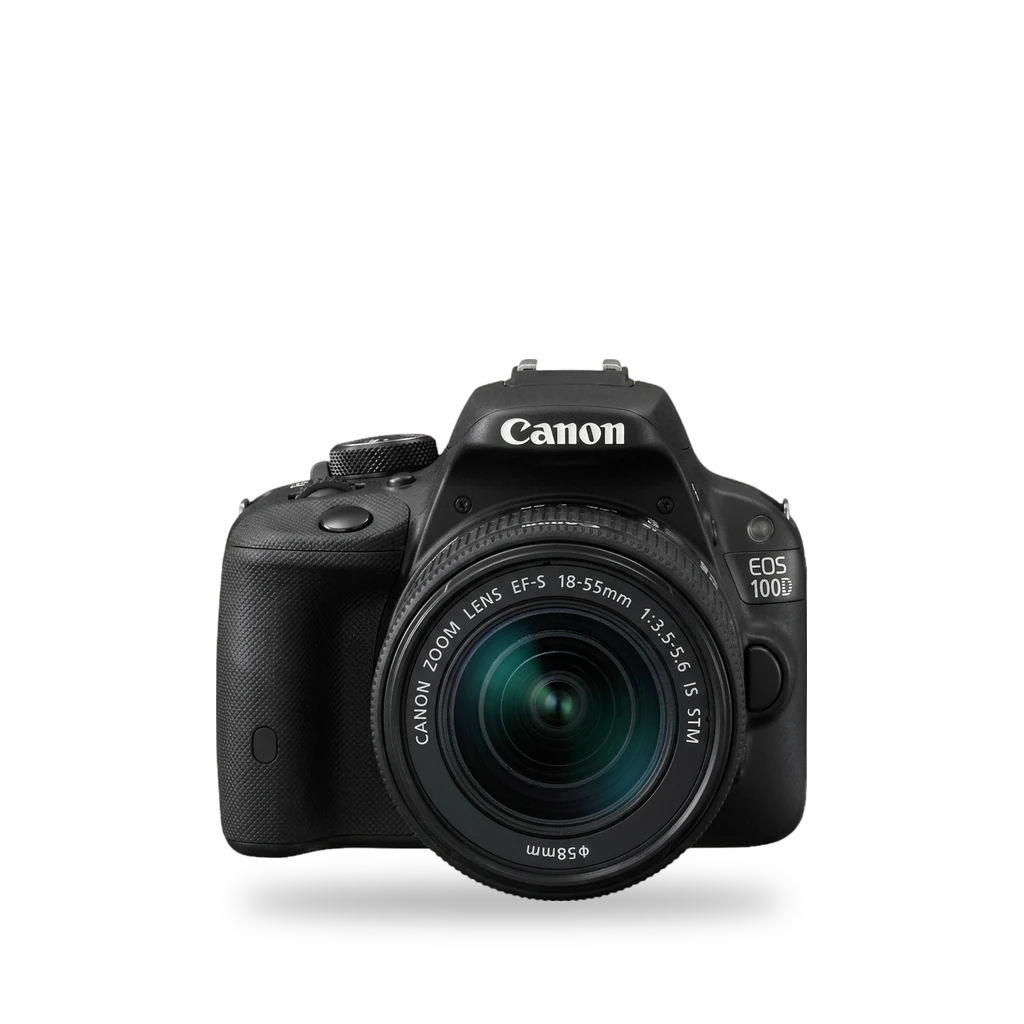
Photo: 1Veertje, CC BY-SA 3.0 · AI-edited (studio background)

CANON · CAMERA · 2013-2014
Canon EOS 100D / 1200D
Also called: EOS 100D · Rebel SL1 · Kiss X7 · EOS 1200D · Rebel T5 · Kiss X70 · EOS Hi
Two entry-level APS-C Rebels that share Magic Lantern as the main mod, with different Canon firmware and ML builds. The 100D (SL1 / Kiss X7) has a 100D.101 platform folder. The 1200D (T5 / Kiss X70) has a 2016 install write-up, but the Magic Lantern Dev tree has no 1200D folder.[6][7][10][12]
Which one do I have?
| Model | Variant | Year | Firmware | How to tell |
|---|---|---|---|---|
| EOS 100D | Rebel SL1 / Kiss X7 | 2013 | 1.0.1 | Smallest EOS DSLR of its era. DIGIC 5, touchscreen, mic jack. Magic Lantern platform folder is 100D.101. Update from Canon 1.0.0 to 1.0.1 before installing ML builds that target 1.0.1.[1][4][6][8] |
| EOS 1200D | Rebel T5 / Kiss X70 / EOS Hi | 2014 | 1.0.2 | Larger entry Rebel with DIGIC 4 and a non-touch 3-inch LCD. Canon offers firmware 1.0.2. A 2016 blog describes ML install; the Magic Lantern Dev tree has no 1200D folder.[2][3][5][10][7] |
Specs
Mods (1)
⚠ Mod at your own risk. We collect what others have published; we have not tested these mods. Read the safety notes
Magic LanternWorks
- ⚠ Can brick A mistake can leave the device unable to start.
- ⚠ Data loss Can erase what is on the device. Back up first.
Free GPL add-on that boots from the SD card next to Canon firmware. Use a build that matches each body's firmware (100D: 1.0.1 / platform 100D.101). The 1200D path is weaker: a 2016 guide exists, but the Dev tree has no 1200D platform folder.[6][7][8][9][10][4][5][13][14][12][11][15]
Parts
- SD or SDHC card, 32 GB or smaller Fits — Used for a first Magic Lantern install. The camera low-level formats it.[13]
Good to know
- Magic Lantern runs from the card as an add-on over standard Canon firmware. It does not replace firmware in ROM.[14][12]
- The Magic Lantern Dev tree includes a platform folder named 100D.101. That build's features.h enables audio meters, audio remote shot, and a crop-mode hack; trap focus is undefined in that file.[7][6]
- For the 100D, update to Canon firmware 1.0.1 first if the camera is on 1.0.0, delete the Canon .FIR from the card, copy Magic Lantern files to the card root, then run the firmware update menu.[8][4][13]
- A 2017 experimental Magic Lantern build added compressed 10-bit RAW video on the 100D. Rebel SD slots are slower than on higher bodies; keep the estimated data rate below about 40 MB/s for continuous recording.[8][9]
- A 2016 blog describes installing Magic Lantern on the 1200D and warns not to delete ML files (format the card instead) and to wait for the card LED before removing the card.[10]
- The Magic Lantern Dev tree has no 1200D platform folder (1100D.105 and 1300D.110 appear; 1200D does not).[7] unverified
- First install: use a simple SD or SDHC card of 32 GB or smaller and a fully charged original battery. The card is low-level formatted; copy the files and run Canon firmware update.[13]
- Hold SET at startup to bypass Magic Lantern for one session. Full uninstall runs Firmware Upgrade in-camera to clear the boot flag.[14]
⚠ Watch out
- Match the Magic Lantern build to the exact Canon firmware on the camera. 100D builds target 1.0.1. The 1200D has Canon firmware 1.0.2 available; confirm the build page before installing.[4][5][6][13]
- The project warns that Magic Lantern can damage or destroy the camera. Magic Lantern writes settings to NVRAM that Canon firmware does not always validate.[13][14]
- After you open the card door, wait for the card LED (or about 5 seconds) before removing the card. Removing it too early can freeze the camera and drain the battery.[13][10]
- Canon does not cover repairs caused by third-party firmware.[15]
- The 2017 10-bit RAW path on the 100D needs an experimental Magic Lantern build, not the standard release.[8][9]
Guides:Magic Lantern INSTALL.txtEnabling 10bit raw video on the mini Canon 100D — EOSHDInstall Magic Lantern on Canon EOS 1200D
Sources (15)
- wiki Canon EOS 100D - Wikipedia · 2026-11-17
- wiki Canon EOS 1200D - Wikipedia · 2026-11-17
- official EOS Rebel T5 - Canon Camera Museum · 2026-11-17
- official EOS Rebel SL1 / EOS 100D Firmware Update, Version 1.0.1 · 2026-11-17
- official EOS Rebel T5/EOS 1200D/EOS Hi Firmware Update, Version 1.0.2 · 2026-11-17
- official magiclantern_simplified/platform/100D.101/features.h · 2026-11-17
- official magiclantern_simplified/platform at dev · 2026-11-17
- blog Enabling 10bit raw video on the mini Canon 100D — EOSHD · 2026-11-17
- news MagicLantern brings new life to the tiny Canon EOS100D with 10Bit RAW video · 2026-11-17
- blog Install Magic Lantern on Canon EOS 1200D · 2026-11-17
- wiki Magic Lantern (firmware) - Wikipedia · 2026-11-15
- official magiclantern_simplified - reticulatedpines · 2026-11-15
- official Magic Lantern INSTALL.txt · 2026-11-15
- official Magic Lantern FAQ.txt · 2026-11-15
- blog Will Custom Firmware Void My Warranty? · 2026-11-15